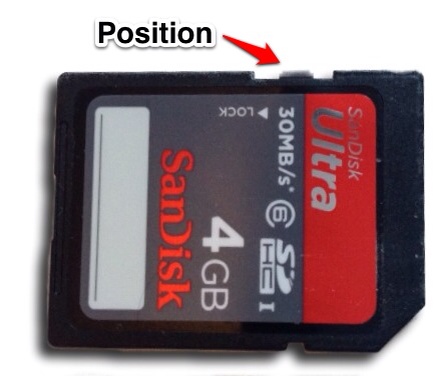
 After getting my Raspberry Pi I used the one built-in on my MacBook Pro, but the SanDisk SDHC-card showed up as read-only in finder on my mac, and Disk Utility refused to format it. The write protection switch on the card was correctly set, so that made me a bit baffled. But it seems that the internal card reader on the MacBook Pro is a bit finicky.
[
Getting your MacBook to Make SD-Cards Writable
The trick to getting the reader to see the card as writable, you need to put the write protection switch on your SDHC or SD-card in the middle because the sensor in the card reader is flaky. After doing that, the card shows up as writable. So now I have my Raspberry Pi up and running with RaspBMC, and I’m a happy dude!
More articles on Raspberry Pi are coming!
Your a life saver. What a ridiculous flaw.
Thanks!!!!!!
wow.. this is why I love the internet .. Years ago we would have all spent days trying to fix these random issues, now that we have a active collective easily accessible knowledge base anything is fixable with a quick google search .. imagine ten years from now the growth of our collective consciousness.. the singularity is near
If I can spare just one person from having to try to fix a problem, I'm a happy puppy!
Thanks a million. Helped so much
You're kidding me... I couldn't write to the SD card, but a quick search brought me to your page where you have the exact same card, coincidentally trying to do the exact same thing, with a solution that worked first time. Thanks for saving me hours of frustration!
You = Hero
Enquired about this problem to mac store sydney. They said it was a software problem and to do a clean reinstall. Couldn't be troubled by that, mac care now over. Will be making further enquiries, yes this is ridiculous. By the way this solution did not work for me. Card reader still read only. Have the same card pictured.
Sometimes you have to set the write protect switch more forward the front of the the card. It's not a software problem. If the card is formatted in NTFS a Mac only have read access so check the format of the card.
How did you come up with that!? Well played and thanks much.
Thank you! This worked immediately.
Thanks a lot!
Holy crap, this worked for me, and (un)coincidentally, I have to set up my sd card for a raspberry pi too!!!
That is amazing .... Just spent ages trying to figure out the problem... What crazy flaw!!! Cheers :)
Thank you, Thank you so much. This is the most surprising issue in Mac I have experienced and I had no idea why it was like that :)
I had the same problem, but it was because the card wasn't mounting properly. The SD formatter could see the card, but it wasn't showing up on the desktop. This is when i would get write-protection issues. My solution was to just keep reinserting the card until it popped up on the desktop.
Thanks SO MUCH, I just ran into this myself.
Wow, thank you very much! *bow*
I had the same problem with my MacBook Pro 15" mid 2009. The problem is a dirty or little bend write protection tip/arm on SD card slot. I had disassemble the motherboard and clean the tip/arm on the side with alcohol and compressed air. Now it works! Not perfect but now I can write two out of five times I put in a SD card.
Thanks buddy. How you came up with this idea I don't know but it really helped :)
Did not resolve it for me at all. I've also seen the recommendation to try positions other than exactly halfway between locked and unlocked. I've moved the slider up and down the path to every conceivable position - no help.
I've read in other forums that sliding the card into the slot a little out of kilter helps as well - not here.
So badly want to update my Canon T2i firmware and install Magic Lantern, but I can't even write to the card - very frazzled.
Glad the solution presented here worked for you all, but I sure wish I could sort it out here ...
Thanks :)
What format is your SD card? If it's NTFS, Finder only allows reading. The card should be either FAT or HFS+
It was a bad card reader - new one resolved it for me. Thx!
omg you are a life saver. back in the day i would have spent so much time trying to figit around with the lock thing or stared at my computer screen trying to figure out what to do to get it to work. Dont know how you figured this out but so glad you did.
Thank a lot,it worked immediately.
Thank you Berry much my Pi will now run on Raspbian and I'll be happy too!
This is great article and very helpful...! Thanks Dude.
Thank you so much for posting this! I have tried to search the web before for this problem and never could fix it. I put all my music on an SD card as I was running out of room on my MacMini and I was unable to delete songs etc. Your trick worked for me and I thank you!
Greetings from Jakarta, Indonesia and I have to agree with Holli Anderson that the internet (and those who positively contribute to it like Jack) are AMAZING. 2 years and 3 months after this post it is still helping people (me), and just a few days ago helped Patrick. Sharing your experiences .... a gift that keeps on giving. Thanks again, this post totally helped me.
Amazing! This worked
I never comment on anything but this was just too awesome of a simple fix for an infuriating problem. you're a life saver
Worked here on an iMac mid 2011. Thanks!
Thank you -- this works, with some fidgeting. Macbook Air 2014 model, with an SD card converter from the drug store. I had to put the switch about 75% of the way towards the front of the card. I tried about five different positions and almost gave up. Then it finally worked, and the card mounted read/write. What a stupid feature/bug. I have physical access to the card and root access to the machine. "Permission Denied" -- oh please!
An alternative solution is to put masking tape or similar over the whole tab like this
https://i.imgur.com/RMy6pDy.jpg
This also works if you have any SD cards where the tab has broken off completely.
This is really stupid.. but worked. For me it's not the halfway, it's 1/4 from the unlock position ;P
Thanks for the solution!
Apple Inc., this hardware and/or design flaw is completely unacceptable. When I shell out $2,499 for one your "state-of-the-art...game-changing...etc." products such as the Macbook Pro, I expect it to function and operate as such. And, having to MACgyver the locking mechanism on an SD card just to allow for read/write capabilities does not constitute a properly functioning feature, if you ask me. Shame on you!
This does NOT work on a Macbook Pro 8,2.
Dude, hail you! This is easily the dumbest issue on the internet, but saves so many people so many frustrations xD
Haha! Yeah, hail me! Yup, pretty stupid, but a motherfucker to find out by trial and error...
Thanks !! Finally it works You're saving me hours of frustration
Crazy, hunted all over for a solution. This worked for me 5 years later, on an SDXC card.
Thanks for this man - exact same card as above, been using it for a year or two, suddenly today I can't erase images any more ♂️.
Your tip fixed it, cheers
2018 now and it still works!!! Thank you sir
#YouAreALegend
You're still saving SD cards all these years later. Thanks.
Makes me feel fuzzy inside, thanks!
Thank you very much. I couldn't believe that worked. I just tried my sd card reader for the first time and experienced the 'read only' problem. People like you have helped me no end over the years and I cannot thank you all enough. A few days ago, CarazyWillTech on YouTube (via Carlos Cdleon) saved my 'crashed' 2011 MacBook Pro with my graphic card error and now you with my card reader. It's amazing how knowledgeable people are with tech. Mind blowing. Thank you.
Read this few years ago; and still doing it TODAY...... all thanks to your fantastic discovery! Owe you much! And by today, i mean 26th June 2023.......... hahahahaha. Thanks, really for this fix.