
If you leave your PlayStation Motion Controller without charging it for a long time, the battery will not charge. Even after you press the reset button, the controller refuses to recharge. Replacing the battery is an easy fix, but expensive, and there is another way of getting the PlayStation Controller to work again.
Low Voltage
The PlayStation Motion Controller uses a Li-Po battery that operates from 3 to 4.25 Volts. If the battery drops way below 3 Volts, the recharging IC in the controller refuses to recharge. This is unfortunate because contrary to popular belief; you can restore a depleted Li-Po battery back to normal again. Naturally, this only works if the battery is still functioning correctly.
https://www.youtube.com/watch?v=sRwoYJyjZNo&frags=pl%2Cwn&ab_channel=bigclivedotcom
Electricity is really just organized lightning.
George Carlin
Disclaimer: If you don’t know your way around electronics, this could go wrong. Don’t attempt this unless you know the dangers of charging a possibly damaged Li-Po battery!
Li-Po Battery Charging Cycle
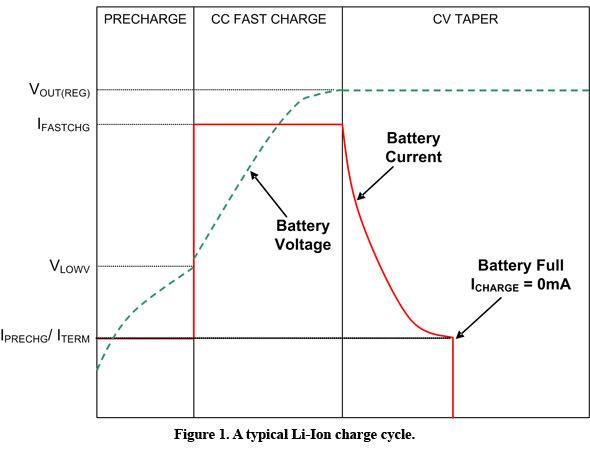
To charge the Li-Po battery, you apply a constant current until the battery reaches 4.2 Volts. The charger then switches to Constant Voltage, keeping the voltage at 4.2 Volts and continues to supply current until the battery is full. So what we are trying to do here is to get the nominal voltage up over 3.0 Volts, which is the cutoff threshold for most charging IC. Anything lower than that, and the charge controller refuses to charge the battery. Hence, the problem. Some smarter controllers tests the battery and recharge without a problem, but not in the PlayStation Motion Controllers.
Restoring The Battery
This will require you to get hold of a lab power supply. If you don’t have one, maybe one of your friends have one. Otherwise, Makerspaces are an option. The power supply needs to support Constant Current mode.
Dissasemble the Motion Controller by removing the four screws on the bottom of the unit. Use a plastic spudger or a small screwdriver to remove the connector for the battery.
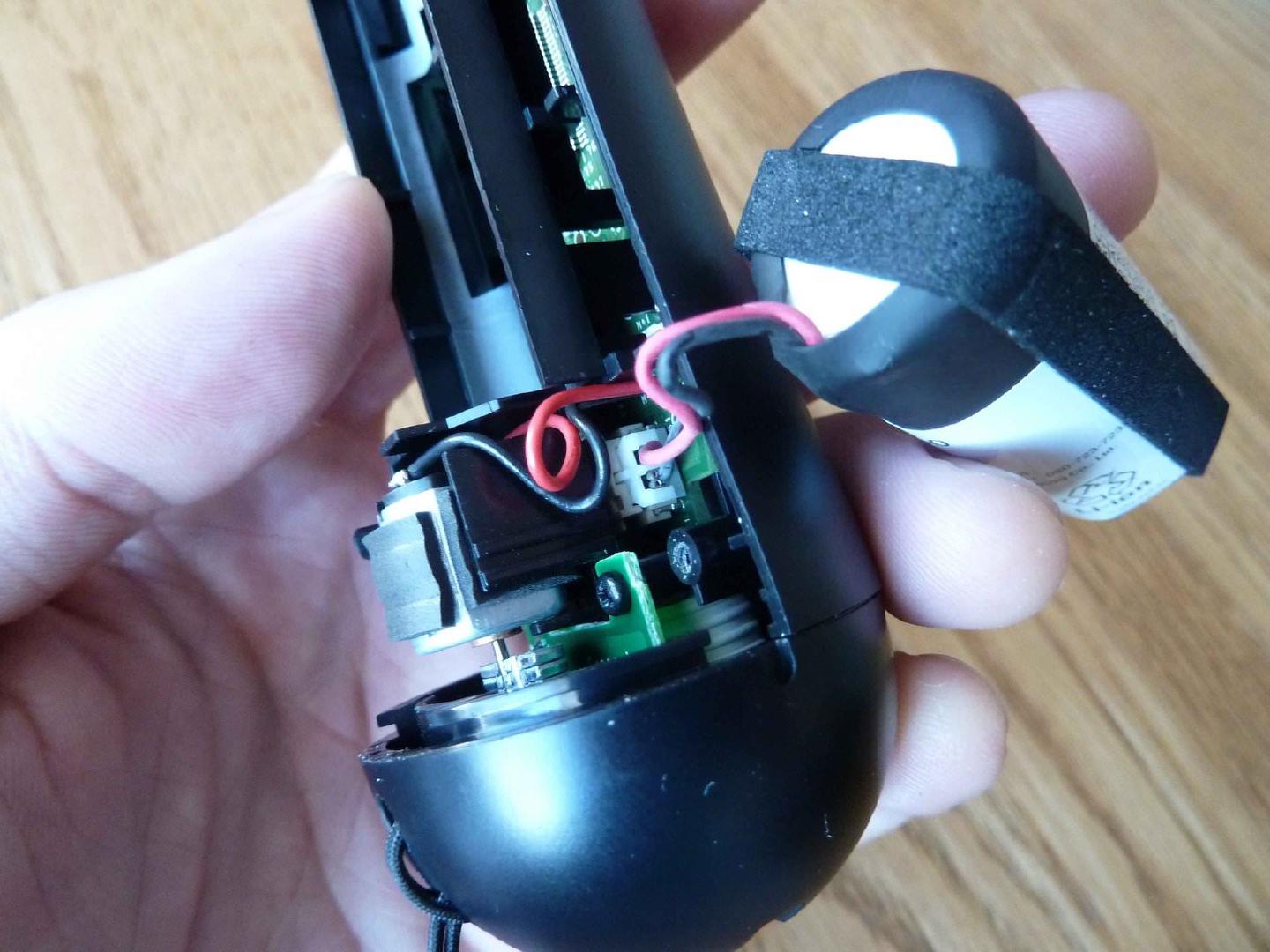
Disassemble the Motion Controller and disconnect the battery.
Setup
Setup the lab power supply to 4.2 Volts and 100 milliAmpere current. It’s safer to start at low current if something should go wrong. Connect thin leads into the connector on the battery and connect the red wire to plus on the lab power supply and do the same for the black wire to minus. Place the battery inside a metal container while charging in case anything should go wrong.
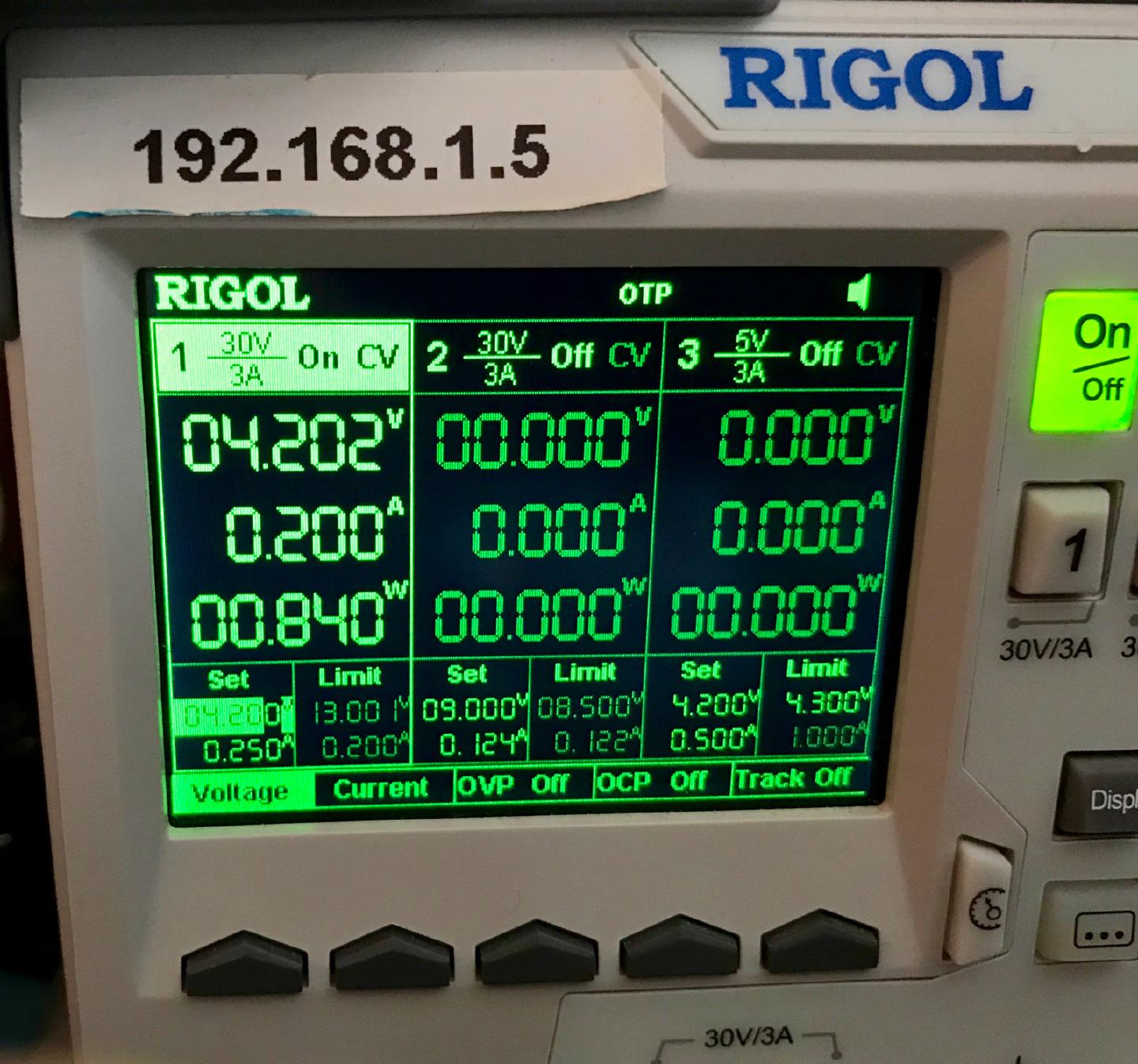
Continue to charge the battery until it shows about 3.5 Volts, and you can increase the current to 250 mA. But make sure that the battery isn’t getting hot. Continue until the voltage reaches 4.2 Volts. You can continue to charge the battery using the lab power supply, or reassemble the Motion Controller and use the regular USB cable to finish the charge.
Results
So far, I’ve successfully restored two PlayStation Motion Controllers. Both of them has been unused for over a year. After the above fix, they now charge without a problem and works as they used to. So back to shooting clowns in Rush of Blood.
would have been could to show one more picture of the charger hooked up to the battery for charging.
Hello, Thank you for this, which works well, event though the battery length seems to have deeply fade. I let the 2 moves on a move support to keep them charged. 1 month later, I noticed the colored led light of both moves do not work anymore ... Note that I may have plugged them to a PS4, in the meanwhile, but they are supposed to be compatible. As of now, all move fonction work except the color light (of both my 2 moves at once !!). I tried to plug them to a PC to force the light on, but I cannot totaly do it (I half syncrhonize them, can get coordinates, not the access to the light). I decided to test the led in side ... 1/ I could not find the reference of the led on the web 2/ Led is connected to 4 broches. If you open the move, let it vertical il front of you the light part up, and the electronic facing you, the wire connecting the led with script on it in front of you, the led facing the side you look at, the numbering the plus from 1 to 4 from the right to the left : * 1 is for positive (right) * 2 for red * 3 for green * 4 for blue (left) 3/ when I try to calibrate, I notice a week signal of about 0,52V between 1 & 3 (green), but no ligth - I guess voltage is far too low ... 4/ if I test the LED out of the Move, all colors work perfectly. Note that very low intesity is sufficient to have some light (if I made no error, I would say 0,45 mA works for all but red, and 1 mA works for red but very low) 5/ all other functions of the move work well, and if I test the Move while pluggin it on the PS or a charger it does not work better ...
Any idea how to solde this issue ? it is so strange that this happended on both my Moves and no on none ... as if there where a firmware update (from the PS4 ?) but it does not seem so, as last time we plug them offthem worked ; and the PS Move charger does not seem to burn theim either but to charge them ...
Thank you for any idea and ready for any test.
I think you missed a valuable bit of important information. The cell is not lipo it is lithium ion First you need to check the cell voltage if it is above 2 volts it is ok to charge if the cell voltage is below 2 volts then yes it will charge but your risking fire. Below 2 volts copper is devolved into the cell electrolyte, when you recharge the coper is redeposited this is not uniform and is called dendrites. Dendrites can piece the separation layer inside the cell this causes a short circuit inside the cell. The result is fire. It is very important to check this. Recharge below 2 volts at your risk