There’s a system called ENUM that enables VoIP servers like Asterisk to check the number your dialing to see if there is a possibility to connect directly to your server instead of going over PSTN land lines. So I registered at E164.org and added my phone number. I tried to figure out how to add this functionality to Asterisk@Home, but couldn’t find anything on how to do it. But I finally managed to get it to work, and it’s really simple. Here’s how I did it.
First you need an account at E164.org. Then you need to register your phone numbers there. An automated voice will call that number to verify, so have your pen and paper ready. Write the code down and enter it in the registration form.
You need to add the following line to the file /etc/asterisk/enum.conf
search => e164.org
Put that line just above search => e164.arpa
Go to the setup page on your Asterisk@home server and select trunks. Choose to add an ENUM trunk.
I have set my system up to only try to find a ENUM route on international numbers, so here’s how I did it. As you can see, it removes the initial 00 (the international prefix) because ENUM numbers should be 46XXXXXXX for a Swedish number.
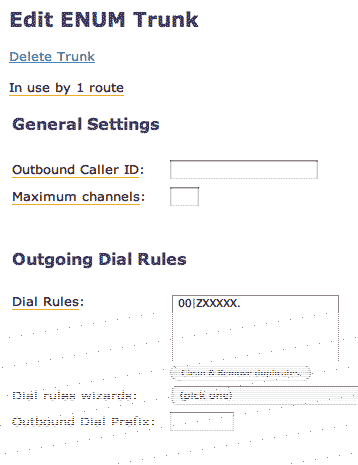
Then I edited the Outbound Routing. This is my international route.
If someone dials 00, this route is called.
I’ve put the ENUM trunk first, and if that fails, it calls though my VoIP provider instead.

Now just reload your settings and off you go!
Check out my setup for setting up a blacklist system on Asterisk@Home
Very good!
I have tried the example above but it does not seem to work:
Yes, I have registered my phone number with enum... and I have edited my enum.conf file.
My ENUM trunk outgoing dial rule is:
XX.
My Route Dial pattern is:
164|XX.
whick will allow me to force dialing to the ENUM trunk so if I dial 16400116124XXXXX, the trunk will dial the full international format 00116124XXXXX through the ENUM trunk.
Unforunately I get the all channel busy message from alison :(
Any advise?
Thanks - Ben
Ben: Are you sure that you registered the number you try to dial at www.e164.org? It need to be, because the ENUM function tries to lookup the number, and if it failed, you get alisons sad voice.
Jacken
Opps! Missed that you already registered the number. You need to remove the 00 in your ENUM trunk. ENUM wants the international number without a dial prefix. So for example, my Swedish number should be passed 4685000XXXX to Enum.
Hi Jacken,
Thanks for replying so promptly.
My ENUM trunk outgoing dial rule is:
XX.
I have changed my route pattern
My Route Dial pattern is:
1640011|XX.
whick will allow me to force dialing to the ENUM trunk so if I dial 16400116124XXXXX, the trunk will dial the full international format 6124XXXXX through the ENUM trunk without the 0011. 0011 is the prefix we use in Australia.. 61 is Australia 2 is the are code and the rest is the actual phone number.
Unforunately I still get the all channel busy message from ever obliging alison :)
I have since registered with Like2Phone as well (affliate of e164.org) and found that I am already registered there as well (simply by registering with e164.org). Try routing through Like2fone yeild the same result.
I am running A@H. Is there any other trick that I need to resort to? I am being hounded by quite a few people to include instruction for enum in my Dumb-Me guide.. and I cant include it if I cant get it working myself :)
- Ben
If you check in the Asterisk console, what do you get? If I dial the Stockholm University (which have ENUM lookup) at +468162000 I get the following on my console.
-- Launched AGI Script /var/lib/asterisk/agi-bin/fixlocalprefix -- AGI Script fixlocalprefix completed, returning 0 -- Executing EnumLookup("SIP/200-3dfb", "468162000") in new stack -- Executing GotoIf("SIP/200-3dfb", "1?14:63") in new stack -- Goto (macro-dialout-enum,s,14) -- Executing Playback("SIP/200-3dfb", "enum-lookup-successful") in new stack -- Playing 'enum-lookup-successful' (language 'en') -- Executing Dial("SIP/200-3dfb", "SIP/+468162000@pstnproxy.sip.su.se") in new stack -- Called +468162000@pstnproxy.sip.su.se -- SIP/pstnproxy.sip.su.se-1448 is making progress passing it to SIP/200-3dfb
I tried the same setup
and noticed if I dialed with idefisk +468162000 with the plus sigh the enum works how ever if I would like to dial it with anything else no dice
I am using a forced dialing route as you have setup up here
try that ben see if your getting the same thing as me by the way you guide to setting up A@H is great
and Jacken this is about the only guide to setting up enum on A@H and I don't think ther eis anything wrong with you information just a bug somewhere
so thanks for tthis as well
I found the answer here
http://sourceforge.net/forum/forum.php?thread_id=1405412&forum_id=420324