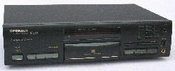
Mods your Pioneer PD S-505 CD Player for better sound quality
So I bought this Pioneer PD S-505 for $40 to test how good audio quality I’m able to squeeze out by modifying it. But It will not be just the standard subjective judgment of improvement but also measurements. Back in 2000, you had to pay about $400 for it. It uses the stable platter which means you have to put the CD in upside down. So let’s get going.
The steps I planned is the following:
- Remove the mute transistors.
- Replace the output opamp
- Remove headphone output
- Replace the clock with a GD-Audio clock
- Improve the regulated voltage feeds to the DAC and opamp
- Improve the power supply
- Add a separate regulated power supply for the crystal and opamp
But first we need the schematic of the player, so download the Pioneer PD-S505 schematic here.
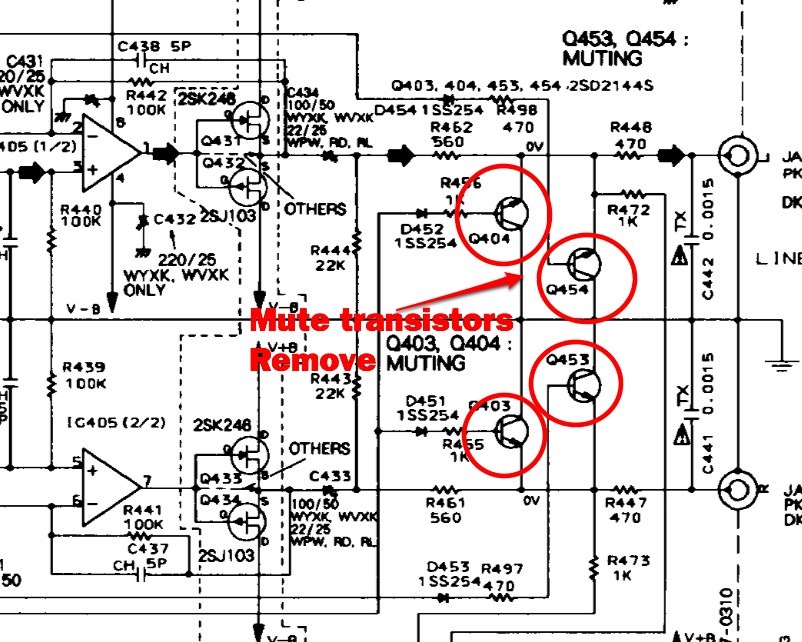
Ok, let’s look at some stuff we need to do. First, we have to remove the mute transistors. Fewer electronics in the audio path gives better sound quality. The transistors are there to make the measurements look better for reviews. So they have to go.
Click for larger image
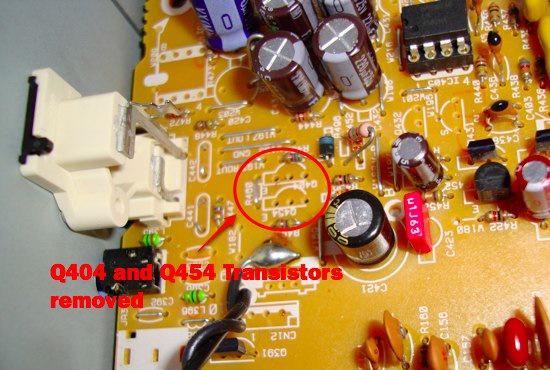
So transistors Q403, Q404, Q453, and Q454 are removed. Desolder och just clip the pins (carefully) with a wire cutter.
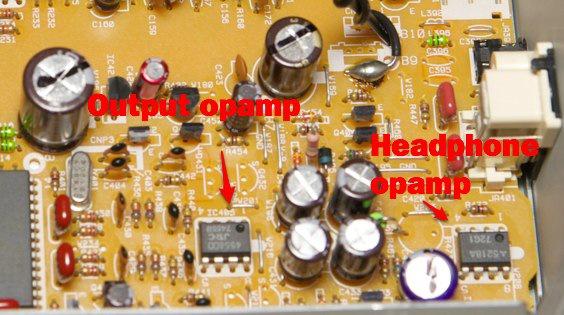
Next step, time to desolder the opamp which is a rather old opamp (NE5532). Desolder the opamp IC405 and solder in a socket for easy testing with different opamps. I settled on LM4562 at first.
Remove the headphone opamp if you don’t plan to use it. It’s better to buy an external headphone amplifier instead.
That’s about it for today. Next installment, upgrade the clock to improve jitter numbers.
On to part two on how to add a better clock to your PIONEER PD S-505
Hi,
I am not an engineer but have built small circuits from kits and have quite a bit of patience. I like the sounds of the above tweaks and would like to know how you got on. How did the equipment sound after the above? I don't have a lot of capital but I am time rich.
Rob
Hey Jack, waiting for the clock from audio-gd, I can tell you that I am not less than very impressed about the performance achieved after replacing the output opamp for a LM4562! Now the musicians jump right out of the speakers, very clear virtuall sight of the envirement-recording and the sound is very clear, natural with tight bass and very smooth frequenzy reproduction throughout the scale!!!!! Tankyou for the very good tutorial and advice! Cheers, Chris
By Ed March 11, 2013 - 5:43 amHere are the images as I metneonid earlier.I apologize if linking URLs is not allowed as I am not sure what other way to share this. On an interesting side note regarding the free 30 protocols, I came across some information on a forum and apparently the guy used his 16032 serial and verification key to register it as a 16128, as he did the eeprom change, but anciently chose 32128 and it still went through. I tried this myself using my serial number and verification key and was able to register as a 322000. I find it odd that the serial numbers are not device bound when choosing to register your model. I could see this as a good and bad thing, good for us, bad for if someone accidentally choose the wrong model in their haste. I can now use the device as a 322000, get the 30 free protocols, and have the included 10. Just my findings and testing so far. I patiently wait for the parts to come in this week and will update you on the completed (hopefully) status of it all.A quick side question, the regarding buffer chip supply voltages, the NXP 74ABT16245BDGG I found was 4.5V 5.5V, while the TI SN74LVT16245BDGGR has a range of 2.7V 3.6V. Now I ordered both parts to be safe, but do you know which of the two work for this modification? and which one I should choose if both work? Thank you!
I'm guessing your writing in the wrong forum. I can't see any use of a 16-bit bus transceiver anywhere in there! :-)
Jacken
But this article was written many years ago. During these years I learned a lot. After reading NWAvGuy's blog at http://nwavguy.blogspot.se I realised that the selection of the op amp is a laborious (and if done right) downright an art. The 5532 is an amazing op amp if used correctly. A clock upgrade on the CD can never hurt, drift due to temperature and especially jitter degrade the performance of the player. How much? I couldn't tell. I did the clock change because I could, just like I've done in this blog post: https://www.jackenhack.com/upgrading-philipsfluke-pm6665-frequency-counter-oven-controlled-crystal-oscillator-ocxo/
Keeping as few components as possible in the output path of the audio signal is good. Do you really need to replace the NE5532 op amps? Well if you have some LM4562 you would probably get a little lower noise level. Would you hear a difference? If you do, it's more likely that it's because the circuit was designed for the NE5532.