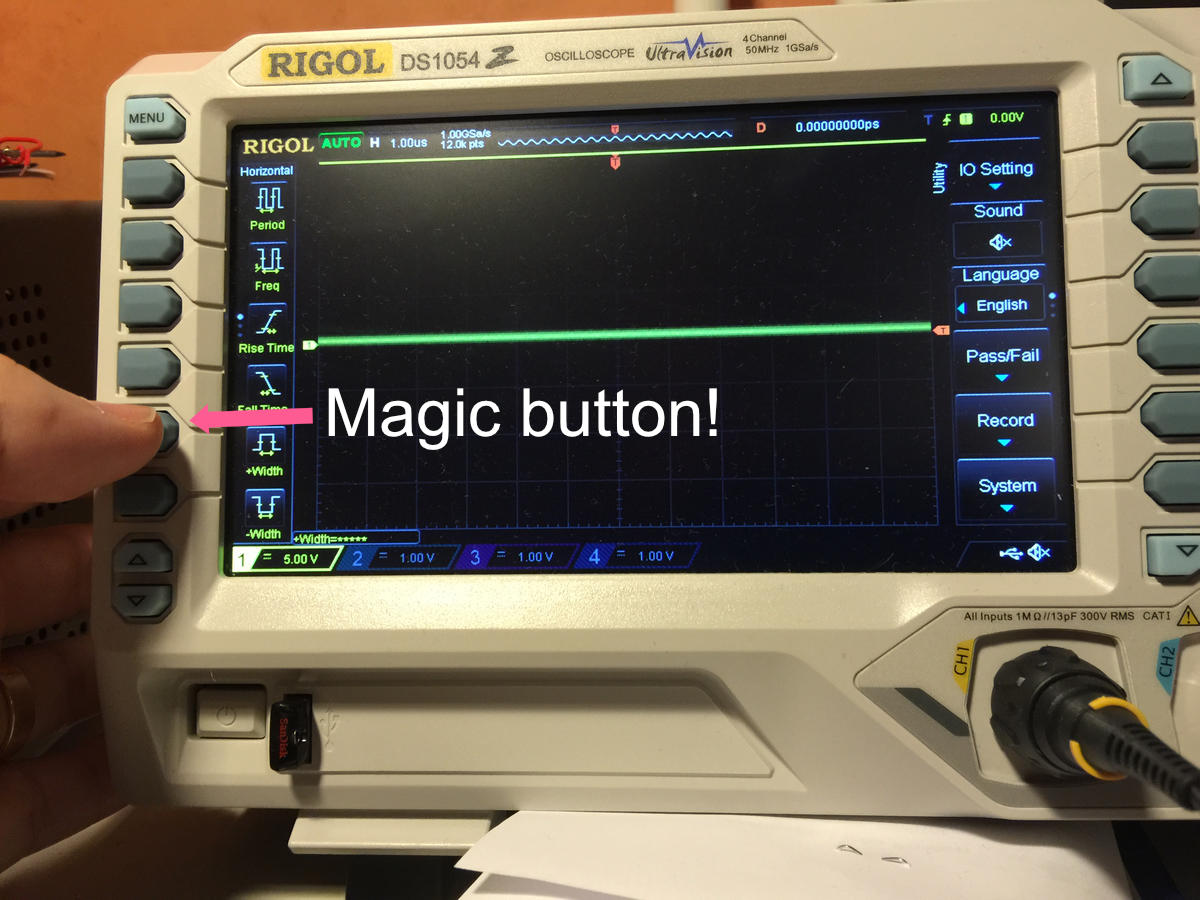
I got myself a four channel 50MHz oscilloscope to be able to do some measurements. The Rigol DS1054Z. It’s expensive in Sweden if you buy it from a local retailer, but I ordered mine from Batronix in Germany and thanks to being part of the EU, there’s no customs and extra taxes added to the price.
The oscilloscope is easily hacked to 100MHz and a lot of other functions like serial protocol decoding and also more memory depth. RS232/UART, I2C and SPI decoding, advanced trigger functions like RS232/UART, I2C, SPI, Runt, Windows, Nth edge, Delay and Timeout trigger. Search for “Rigol DS1054Z hack,” and you’re on your way to transform your scope to a much more expensive version. But don’t enable the 500µV option. The oscilloscope doesn’t support it in hardware, so you will run into bugs if enabled.
I’ve been delighted with my purchase, except for the occasional bug. But today it went into a total haywire mode. When trying to start it up, it hangs on boot. Either by just showing the Rigol boot screen, or show the standard display but remain immune to any input from the controls. Panic! But thankfully I found a solution to my problem.
Resetting the Rigol DZ1054Z oscilloscope
After searching the net, I finally found a way of resetting the oscilloscope to factory settings and get it up and running again. On the left side of the front panel, there are six dark grey menu select buttons. And the magic one is the fifth from the top. To reset the oscilloscope, just power off and then on the scope, repeatedly pressing the fifth button and the oscilloscope resets to factory settings. Yeah, the menu changes to Chinese, but that’s easily fixed by just selecting English in the language settings on the list to the right of the screen. Up and running again! Hurray!
hi friend, thanks for your very good information, I have done the hack a few minutes ago & everything works fine but I have to be warned to future troubles, thanks to you now I am, I have one question, after doing the factory reset it disables the hack? the scope turns again the 1054z version instead of 1104z? thanks again
Hi! The hack works even after doing the reset, so no worries.
Hi, Thanks,
Did not know about the issues with 500µV option. and off course added everything. Do you know if there is a way to delete a license? Maybe not normally needed... Thanks for this Post, It got me out of the crap today.
Kind regards James
Hi Jack,
Thanks so much. My DS1054Z had the same problem. A totally unresponsive frozen screen that would not be fixed by a reboot. I powered down and backup again hitting the magic button all the time and everything went Chinese but it started working again. It defrosted. You are a star. God bless the internet.
sir please help me i have metravi DSO-5050A it got hang on startup please help me
Hi I have just updated the firmware on my Rigol DS1054Z to 00.04.04 and I get invalid licence when I tried the hack. Has anybody tried the hack with that firmware?
Hi Have you been able to fix this license issue. I was planning to buy if it works
No, I'm sorry to tell that I have tried many times to no avail
Hi - May be you could downgrade the firmware to a lower version (find which is the last one which worked). Then apply the hack and see that you are able to get 100 Mhz and then upgrade t back to latest one. Not sure it will work but I see that people have done it with other models. I dont have it so easy for me to say but if it works its worth trying
I found a link. Just now. Please see this http://www.eevblog.com/forum/testgear/is-ds1054z-with-firmware-00-04-02-04-07-hackable/.
One person said he generated the serial in a different machine and this time it worked. I know you may have tried lot of things but saw something which not sure if it helps. No harm trying :-)
I think I have the latest firmware and have no issue with the hack.
I think I am really lucky. I ordered a demo piece at 15% discount (final cost to me around $330). I started with the process but as soon as looked into the serial I could not believe my eyes. I have the latest Rigol 1104Z firmware with all options installed. It works great . Thank you Rigol :-)
Great to hear! You get a lot of gear for the price. Both with Rigol and Siglent. Next up on the wish list, the Siglent SSA3000X spectrum analyser.
There are only 5 unmarked grey buttons on the Rigol 1052e running on the right of the display but as soon as I powered on and pressed 5th button, The start up screen appeared then the normal screen
Prior to this no display or lights-/leds just fan running
I let it do a calibration which it completed
Unit has been barely used and not hacked/soft modded
Powered down and restarted- back to blank screen no lights.
So the unit did work briefly but something's not right
Uauu... Reset ok. Perfeito. Muito obrigado.