
Update 2026
I stopped using Airmail two years ago. More and more problems started to pop up, especially on the iOS version. So I have moved to Apple Mail again. On Linux I use Thunderbird mail.
Update to the update 2018
Still my favorite email client, and I’m now also blessed with a version for iPad and my iPhone. It’s up to version 3. It never crashes, and the search is fast and excellent. Best email client ever!
Update 2016-02-16
I’m still using Airmail now, two years after I wrote this post. It has never failed me in any way. It’s now up to version 2. I guess Apple has probably fixed a lot of the problems they had back then when connecting to Gmail. And let’s face it, Google changed a lot from the original IMAP standard, so everyone had to keep up. But I’m sticking with Airmail 2. Now there’s even an excellent version for Airmail for iOS. And you’ll feel right at home. It also syncs your settings from your Mac OS X application, so now I have an HTML signature on my iPhone. Yay! The only complaint is that they did the app for iPhone only and not an iPad version. In a perfect world, it should have been a universal app. But hopefully, they’ll fix that in the coming months.
Airmail, my new favorite mail client
After Mac OS X 10.8, Apple Mail has been going downhill by every update. It’s weird because the iOS Mail app is rock solid. I have my email domain on Google Apps, and I know that Gmail doesn’t follow the IMAP standard, instead choosing to do it their way. So they use tags instead of folders, etc. The blame has to be put on Google for not following standards but is a significant player; you can pretty much set your own rules. Anyway, Apple Mail has become a slow, unreliable application although they have fixed some of the more severe problems in the latest release. For the first time in many years, I was on the lookout for a new email client software.
Time to find a new Mail Client
I wanted to be able to have both of my private and work email accounts in the same program but have them separate to make life easier, and after searching the net, I found an application called Airmail. The feature list is comprehensive to the point of me not wanting to list all the features here, but follow the link to get a lowdown on all the things the application can do. I’ll go through the things that persuaded me to switch.
Speed
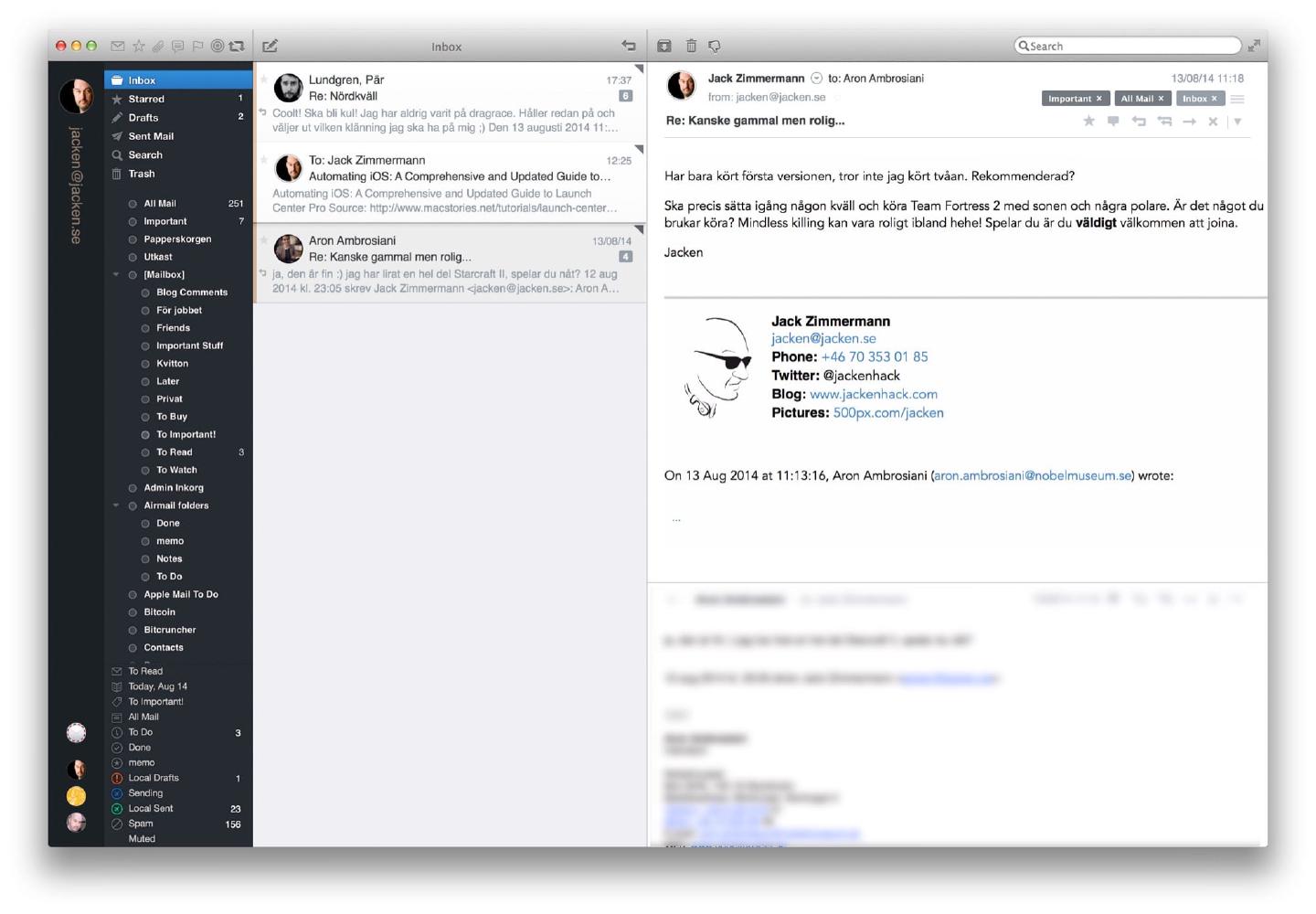
Airmail is fast. I mean, really fast! I just bought a new MacBook Pro 15" Retina with a 2.5Ghz Intel i7, so it’s probably not the best computer to pass any judgment on the speed of an application, but my computer at work is a three-year-old MacBook Pro, and Airmail feels very fast on that machine as well.
Switching between email accounts
 When setting up several email accounts in Airmail, it’s easy for the user to switch between them. I have two private email addresses and one for work that I have configured in the application. There is an option to use a unified inbox, but for me, it’s much better to have my work emails separated from my private ones. You can either switch by clicking on the small icons on the bottom left column in the application window, but a quicker way is just to use ctrl–1, ctrl–2 or ctrl–3, etc. to be able to switch between your accounts.
Depending on the one you chose, Airmail will use the correct reply address and signature specifically for that account. Very convenient, and cuts down on mistakenly sending email from the wrong return address.
Menubar Icon

Another great feature is the small icon in the menubar that shows a little airplane symbol. It is black when there is no new mail, but turns blue and shows the number of new emails. The icon works as a toggle, so if you press it, the Airmail application becomes the front application, but if you push it again, the Airmail window disappears. A great feature because I no longer need to have the mail application showing all the time. That’s a handy little feature. When a new email arrives, you get a nice looking system notification through OS X standard notification system.
OmniFocus
I do all my planning both for work and private projects in OmniFocus so it’s nice to see that there is built-in integration with OmniFocus, a program that I can’t live without. No more problems when Apple updates Mail and makes the OmniFocus plug-in stop working.
You can send emails directly to OmniFocus by right-clicking the message and select the submenu ‘dispatch’ and choose ‘Create OmniFocus Task,’ and a new task window will appear. It creates a new task and adds a URL to the specific email message.
Quick Entry
Often you only need to make a quick reply to an email thread without any signature at the bottom. By pressing Command-E, you get a fast entry dialog box for entering your answer. It usually replies to the primary sender, but if you want to respond to all persons, just press Command-Shift-E.
MultiMarkdown
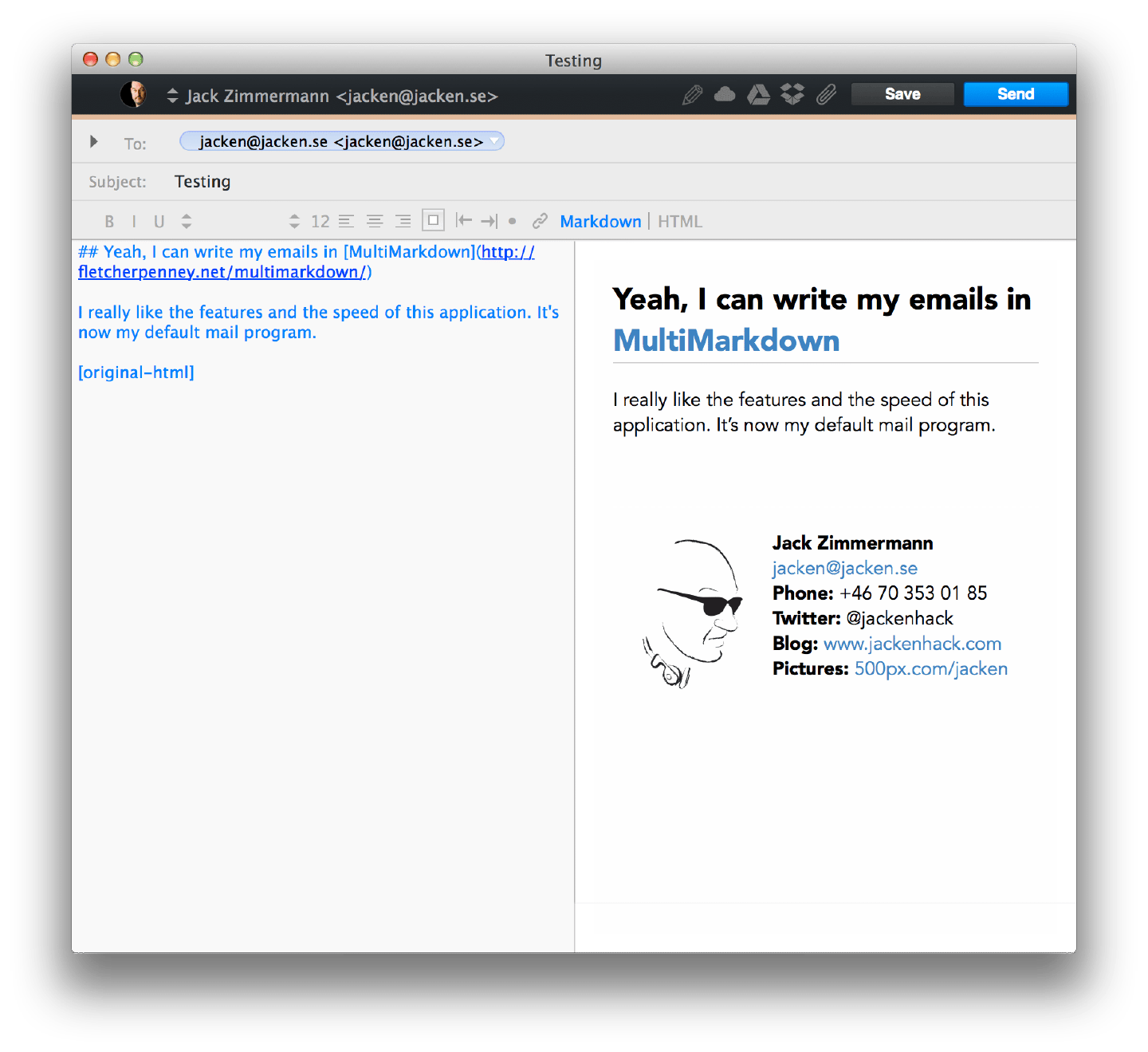
You have the option to write your email messages in either plain text, rich text, HTML or MultiMarkdown. For me, this is a great feature, because I write everything in Markdown these days. But if your old school, or have recipients that have inferior email client software, you can always write and send it as plain text.
Email Signatures
It’s easy to set up a nice looking signature that will show up at the end of your messages because you can write the signature in Markdown or HTML. You can do an HTML signature in Apple Mail as well, but it’s not for the faint of heart. In Airmail it’s dead simple, primarily if you use Markdown to generate nice HTML code.
External File Sharing Services
Most email servers have a limit on how large attachments you can have. The limit the servers usually have are somewhere between 5 to 20Mb. Airmail provides the ability to link an external service, so it uploads a large attachment and then provides a URL to the file. Currently, these are the services you can connect to:
- FTP Attachments
- Dropbox
- Google Drive
- Droplr
- CloudAppSo as you can see, there’s plenty of options for sending large files to a recipient without having problems with mail servers returning the mail because it is too large.
Encryption
There are plugins for S/MIME and GPG available to download separately, I have both the S/MIME and GPG plug-in installed, and it works as it should.
Small nitpicks
Sometimes when an email conversation is selected, and a new mail arrives, it doesn’t show up, so you have to choose another message and then select the discussion again for it to show. This is a small bug and one of the few I encountered. I’m using Airmail both at work and at home, and this is the only bug I’ve seen so far after a couple of weeks of intensive use, so it’s a small issue that will be fixed in an update. There’s also a tiny cosmetic error (that I have reported to the makers of Airmail) in the Swedish translation of the application. Other than that, I haven’t had a single problem with the app.
Cost
 This application is insanely cheap. Currently, it has an introductory price of $1.99, so you don’t have to risk a lot of money to try it out, and if you do, I’m sure that you’ll like it. If not, you just lost less money than a decent cup of coffee.
idiot article. apple mail is very good. desperate site.
I think Apple Mail is rubbish too. I use POP and handle a large volume of mail per day and have many thousands of saved emails, in different mailboxes, which I need easy access to. The search in Mail is next to useless, it beach balls all the time and frequently fails to find the email I'm looking for (and yes, I have rebuilt and re-indexed the mail boxes). It doesn't handle attachments properly, so I have to use a plug-in. And what's with showing attachments at the bottom of the email? They are easy to miss if attached to a long chain.
Maybe, but then will I have to pay $9.99 or more for required updates every year when the OS is updated?
I have to agree that this is a really poorly written article. For example, what about import and export? The app's no good if you can't seamlessly import all your old mail, and if you can't just as easily export, then you're stuck with it. Really, that's a pretty obvious point to gloss over...
I wrote the article based on my personal view. I always make sure that I don't have anything saved locally and use iMAP for storage. So import or export isn't a feature that I need. As I said in the beginning of the article, "The feature list is comprehensive to the point of me not wanting to list all the features here, but follow the link to get a lowdown on all the things the application can do.", so if you find my blog post lacking in information, that information is just one click away.
Maybe I'm not clear about it, but I use Google Apps and Gmail. How Apple Mail handles iMAP when having an Gmail account has been flaky at best.
NO ENCRYPTION - WORTHLESS.
I bought Airmail 2 for 10 bucks. It was kind of promising, but slow to set up with non gmail imap. It took 10-20 minutes until one imap account was authenticated. Apple Mail does this in under 10 seconds.
I set up 3 accounts, and all in all it was a nice experience, I liked the interface, no encryption was a whoops, but simply it didn't convince me to jump ship. It's worth a try (2 lattes in Starbucks) thouhg.
There is both a S/MIME and GPG plugin available for download.
"But if your old school, or have recipients that have inferior email client software, you can always write and send it as plain text."
You're.
procedure how to import my data emails from Mail to Airmail Thanks
Very easy (works with AirMail 2)
1/ Create a new account and choose "local account"
2/ If you want to import all your Apple Mail folders, simply go to this new local account settings, choose to import files and select the main mailbox folder from Mail (not a blablabla.mbx file, but the root folder of these files).
3/ Wait for the import (took me an hour for 60 000 mails...) and "voilà" you have all your mails with the correctly named folders from Mail
I am using the Airlmail for quite some time now.. to be honest I really like it .. specially whey I need to manage multiple accounts
Yeah, still love the program even more now than when I wrote my article. Five different accounts and easy switching. Love it!
How can I get all my Apple Mail data into AirMail?
There's an "import" function under FILE, but when I take that route, I get "No Account To Import"... there's no specific help for this.